Trading Bot System
Welcome to the Trading Bot System documentation!
This system provides a framework for building and deploying automated trading bots that:
[!WARNING] DISCLAIMER: This software is for educational and research purposes only. Trading involves significant risk of loss and is not suitable for all investors. Use of this framework (including "Live Trading" features) is strictly at your own risk. The authors and contributors are not liable for any financial losses, damages, or unintended trades incurred. Always test strategies thoroughly in a paper-trading environment before deploying real capital.
- Fetch market data from Yahoo Finance
- Apply technical analysis indicators
- Make trading decisions based on configurable strategies
- Manage portfolios and track trades in PostgreSQL
- Run on configurable schedules via Kubernetes CronJobs
Quick Links
- Bot Implementation Levels ← Start here! Learn the three bot patterns (Level 1/1b simple, Level 2 advanced)
- Quick Start Guide - Get up and running in minutes
- Creating a Bot - Learn how to build your first bot
- Bot Class System - Understand the core architecture
- AI Tools Guide - LangChain + OpenRouter tools (market data, portfolio, recent trades)
- Telegram Monitor - Monitor Telegram channels for trading signals
- Live Trading Guide - Mirror your paper-trade portfolios to real brokerage accounts
- API Reference - Complete API documentation
- AITools API - run_ai_with_tools, run_ai_simple, run_ai_simple_with_fallback
Key Features
Simple Bot Creation
Create a trading bot by simply implementing a decisionFunction():
from tradingbot.utils.botclass import Bot


class MyBot(Bot):
    def __init__(self):
        super().__init__("MyBot", "QQQ", interval="1m", period="1d")

    def decisionFunction(self, row):
        if row["momentum_rsi"] < 30:
            return 1  # Buy - oversold
        elif row["momentum_rsi"] > 70:
            return -1  # Sell - overbought
        return 0  # Hold
Technical Analysis
Access 150+ technical indicators automatically:
- Trend indicators (MACD, SMA, EMA, ADX, Ichimoku, etc.)
- Momentum indicators (RSI, Stochastic, ROC, etc.)
- Volatility indicators (Bollinger Bands, ATR, Keltner Channels, etc.)
- Volume indicators (OBV, CMF, MFI, etc.)
Portfolio Management
Built-in portfolio management with automatic trade logging:
bot.buy(symbol="QQQ", quantityUSD=1000)
bot.sell(symbol="QQQ", quantityUSD=500)
bot.rebalancePortfolio({"QQQ": 0.8, "GLD": 0.1, "USD": 0.1})
Performance Visualization
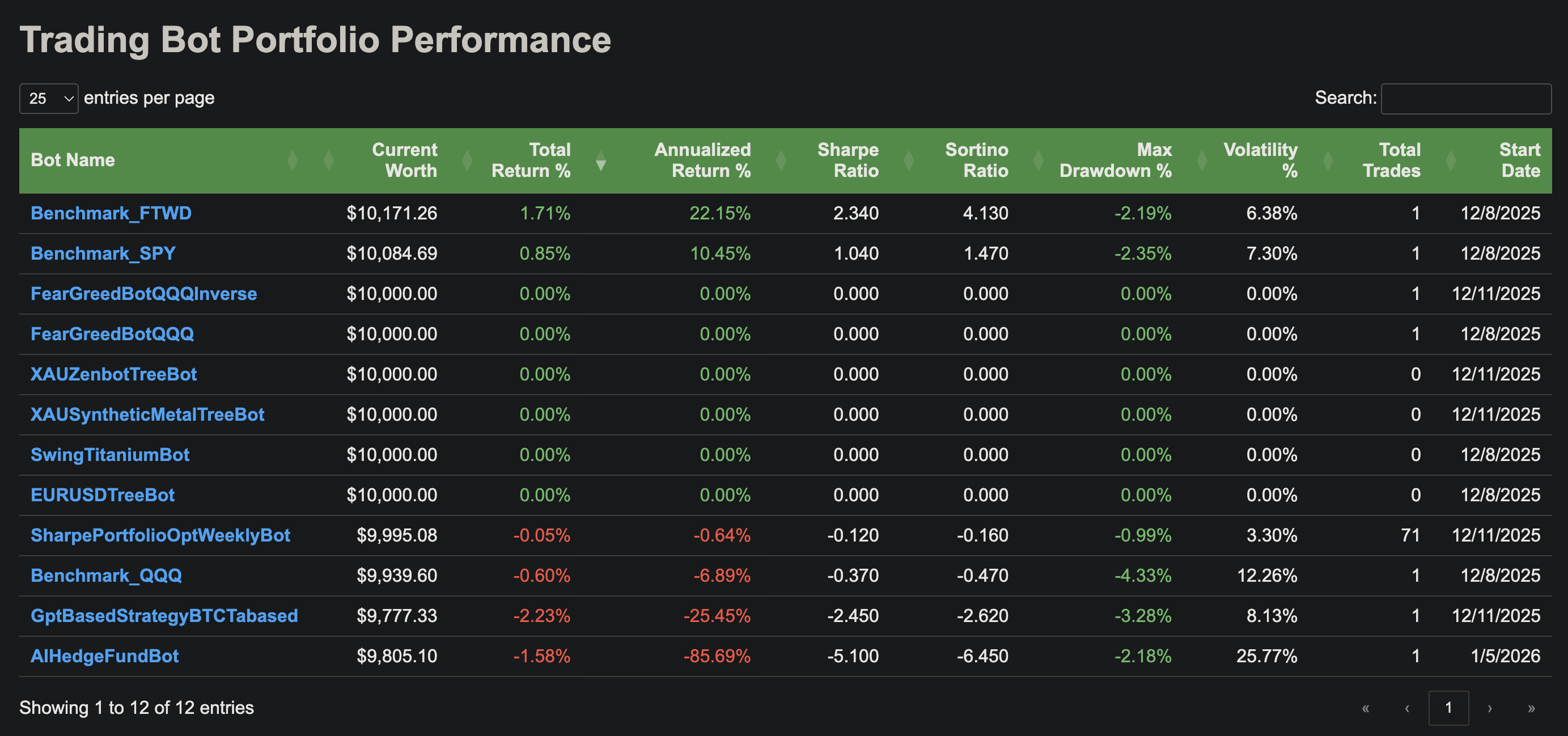
Monitor all your bots with a comprehensive web dashboard showing portfolio performance, risk metrics, and trade history:
Hyperparameter Tuning
Optimize your bot's parameters automatically:
AI Tools (LangChain + OpenRouter)
Run the AI with a system prompt and user message; the model can use tools to access market data, portfolio status, and recent trades (including profit on sells). Two LLMs: main (for tool-using flows) and cheap (for simple single-turn tasks). Use run_ai_simple_with_fallback to try the cheap LLM first and retry with the main LLM if the output fails a sanity check. Requires OPENROUTER_API_KEY. See AI Tools Guide.
response = bot.run_ai(
    system_prompt="You are a trading assistant.", user_message="Summarize my portfolio and recent trades."
)
Deployment
Deploy to Kubernetes with Helm:
helm upgrade --install tradingbots ./helm/tradingbots \
  --create-namespace --namespace tradingbots-2025
Documentation Structure
- Getting Started: Installation and quick start guides
- Architecture: System design and core concepts
- API Reference: Complete API documentation with examples
- Core classes (Bot, DataService, PortfolioManager, etc.)
- Utilities (Database, Backtesting, Hyperparameter Tuning)
- Integrations (Telegram Monitor)
- Deployment: Kubernetes and Helm deployment guides
- Guides: In-depth tutorials and best practices
- Bot Implementation Levels - When to use decisionFunction vs makeOneIteration, backtestability, trade-offs
- Technical Analysis
- Portfolio Management
- AI Tools
- Telegram Monitor
- Local Development
- Examples: Real-world bot implementations
Need Help?
- Review the Example Bots for implementation patterns
- Check the Deployment Guide for documentation deployment setup
- See the API Reference for complete API documentation